AI Movement
Asynchronous AI movement with completion callbacks
The UUDAT_MoveToLocation async task provides a simplified way to move characters and AI to a destination with completion callbacks.
MoveToLocation
Moves a controller's pawn to the specified location. When movement completes (success or failure), the Completed delegate is called.
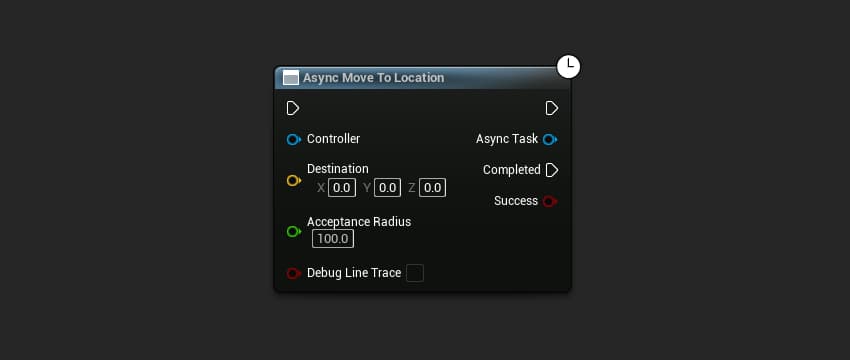
The node provides:
- Completed output pin with
bSuccessparameter - Latent execution (runs over multiple frames)
#include "AI/UDAT_MoveToLocation.h"
#include "GameFramework/Controller.h"

void AMyCharacter::MovePlayerToLocation()
{
    UWorld* World = GetWorld();
    AController* Controller = GetController();
    const FVector Destination(100.0f, 200.0f, 300.0f);
    constexpr float AcceptanceRadius = 100.0f;
    constexpr bool bDebugLineTrace = false;

    UUDAT_MoveToLocation* Task = UUDAT_MoveToLocation::MoveToLocation(
        World,
        Controller,
        Destination,
        AcceptanceRadius,
        bDebugLineTrace
    );

    if (Task)
    {
        Task->Completed.AddDynamic(this, &ThisClass::OnMoveCompleted);
    }
}

void AMyCharacter::OnMoveCompleted(bool bSuccess)
{
    if (bSuccess)
    {
        UE_LOG(LogTemp, Log, TEXT("Movement succeeded!"));
    }
    else
    {
        UE_LOG(LogTemp, Warning, TEXT("Movement failed!"));
    }
}
Parameters
| Name | Type | Default | Description |
|---|---|---|---|
WorldContextObject | UObject* | Required | The world context |
Controller | AController* | Required | The controller to move |
Destination | FVector | Required | Target location |
AcceptanceRadius | float | 100.0f | Distance from destination considered "arrived" |
bDebugLineTrace | bool | false | Show debug line to destination |
Delegates
| Delegate | Parameters | Description |
|---|---|---|
Completed | bool bSuccess | Called when movement finishes |
Set AcceptanceRadius to a reasonable value. Characters rarely reach the exact destination point, so a small radius prevents the task from running indefinitely.
Stuck Detection
The task includes built-in stuck detection. If the pawn stops making progress toward the destination, the task will fail after a timeout.
Stuck Detection Properties
These can be configured before starting the task:
| Property | Type | Default | Description |
|---|---|---|---|
StuckCheckInterval | float | 0.5f | Seconds between stuck checks |
StuckThreshold | float | 10.0f | Minimum distance to move between checks |
MaxStuckTime | float | 3.0f | Seconds before declaring stuck |
Configuring Stuck Detection (C++)
UUDAT_MoveToLocation* Task = UUDAT_MoveToLocation::MoveToLocation(
    World,
    Controller,
    Destination,
    AcceptanceRadius,
    bDebugLineTrace
);

if (Task)
{
    // Configure stuck detection
    Task->StuckCheckInterval = 0.25f;  // Check more frequently
    Task->StuckThreshold = 5.0f;       // Require less movement
    Task->MaxStuckTime = 5.0f;         // Wait longer before failing

    Task->Completed.AddDynamic(this, &ThisClass::OnMoveCompleted);
}
Use Cases
Simple Movement
// Move to a pickup
UUDAT_MoveToLocation::MoveToLocation(
    GetWorld(),
    GetController(),
    PickupLocation,
    50.0f,
    false
)->Completed.AddDynamic(this, &ThisClass::OnReachedPickup);
Patrol System
void APatrolCharacter::MoveToNextPoint()
{
    CurrentPatrolIndex = (CurrentPatrolIndex + 1) % PatrolPoints.Num();

    UUDAT_MoveToLocation* Task = UUDAT_MoveToLocation::MoveToLocation(
        GetWorld(),
        GetController(),
        PatrolPoints[CurrentPatrolIndex],
        100.0f,
        false
    );

    Task->Completed.AddDynamic(this, &ThisClass::OnPatrolPointReached);
}

void APatrolCharacter::OnPatrolPointReached(bool bSuccess)
{
    // Wait at patrol point, then continue
    FTimerHandle WaitTimer;
    GetWorldTimerManager().SetTimer(
        WaitTimer,
        this,
        &ThisClass::MoveToNextPoint,
        PatrolWaitTime,
        false
    );
}
Debug Visualization
Enable bDebugLineTrace during development to visualize the movement path:
UUDAT_MoveToLocation::MoveToLocation(
    GetWorld(),
    GetController(),
    Destination,
    100.0f,
    true  // Show debug line
);
Failure Conditions
The task fails (bSuccess = false) when:
- Controller is invalid - The controller was destroyed or is null
- Pawn is invalid - The controller has no pawn
- Stuck detection triggered - Pawn stopped making progress
- Path blocked - Navigation system cannot find a path
- Task cancelled - Manually cancelled via code
Always handle the failure case in your completion callback. Don't assume movement will always succeed.