PluginsUDCoreFeaturesFunction Library
Enhanced Input Functions
Utilities for managing Input Mapping Contexts
The UUDCoreInputFunctionLibrary provides utilities for working with Unreal Engine's Enhanced Input System, making it easier to manage Input Mapping Contexts.
These functions require the Enhanced Input plugin to be enabled in your project.
Managing Input Mapping Contexts
AddInputMappingContexts
Adds multiple Input Mapping Contexts to a player controller at once.
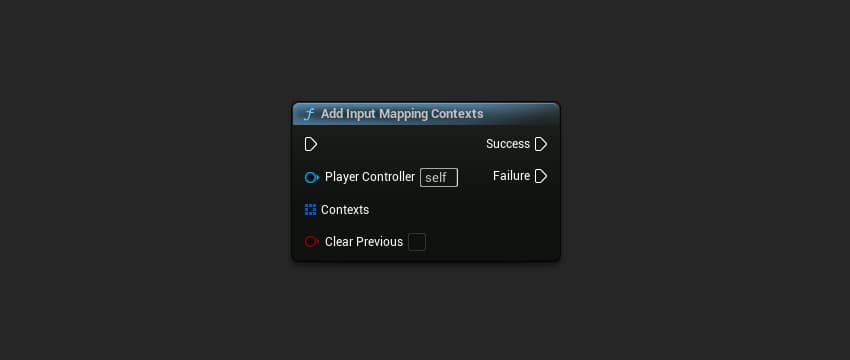
AController* PlayerController = GetPlayerController();

TArray<FUDCoreEnhancedInputContextData> Contexts;
// Add your contexts with priorities
Contexts.Add(FUDCoreEnhancedInputContextData(MovementContext, 0));
Contexts.Add(FUDCoreEnhancedInputContextData(CombatContext, 1));

bool bClearPrevious = false;
EUDSuccessStatus Result = UUDCoreInputFunctionLibrary::AddInputMappingContexts(
    PlayerController,
    Contexts,
    bClearPrevious
);
Parameters
| Name | Type | Description |
|---|---|---|
PlayerController | AController* | The controller to add contexts to |
Contexts | TArray<FUDCoreEnhancedInputContextData> | Array of contexts with their priorities |
bClearPrevious | bool | If true, remove all existing contexts first |
Returns
| Name | Type | Description |
|---|---|---|
ReturnValue | EUDSuccessStatus | Success if contexts were applied successfully |
RemoveInputMappingContexts
Removes multiple Input Mapping Contexts from a player controller at once.
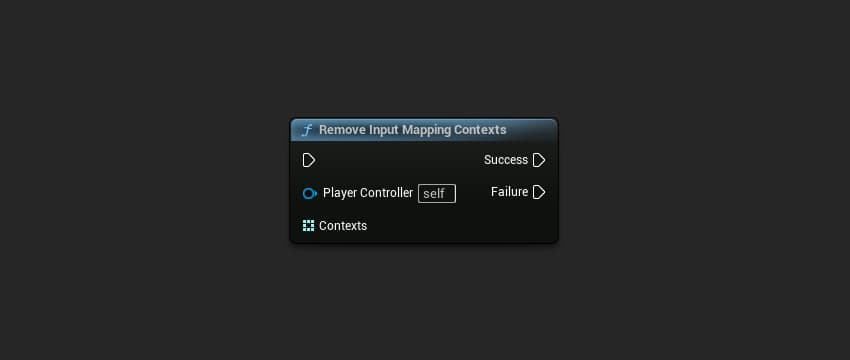
AController* PlayerController = GetPlayerController();

TArray<TSoftObjectPtr<UInputMappingContext>> ContextsToRemove;
ContextsToRemove.Add(OldContext1);
ContextsToRemove.Add(OldContext2);

EUDSuccessStatus Result = UUDCoreInputFunctionLibrary::RemoveInputMappingContexts(
    PlayerController,
    ContextsToRemove
);
Parameters
| Name | Type | Description |
|---|---|---|
PlayerController | AController* | The controller to remove contexts from |
Contexts | TArray<TSoftObjectPtr<UInputMappingContext>> | Array of contexts to remove |
Returns
| Name | Type | Description |
|---|---|---|
ReturnValue | EUDSuccessStatus | Success if contexts were removed successfully |
SwapInputMappingContexts
Swaps one Input Mapping Context for another, optionally preserving priority.
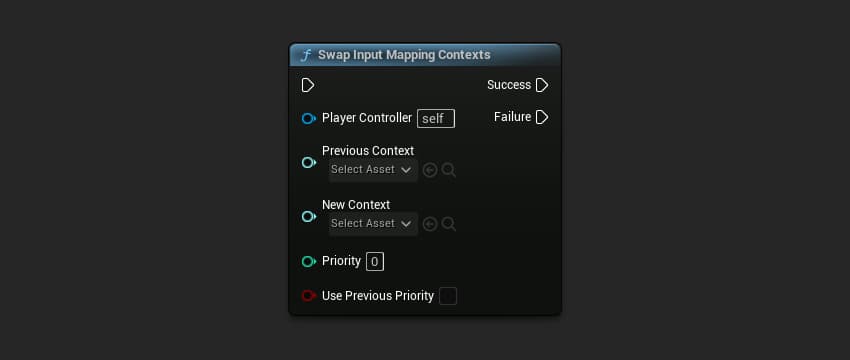
AController* PlayerController = GetPlayerController();

EUDSuccessStatus Result = UUDCoreInputFunctionLibrary::SwapInputMappingContexts(
    PlayerController,
    WalkingContext,      // Context to remove
    SwimmingContext,     // Context to add
    0,                   // Priority (ignored if bUsePreviousPriority is true)
    true                 // Use the priority from WalkingContext
);
Parameters
| Name | Type | Description |
|---|---|---|
PlayerController | AController* | The controller to swap contexts on |
PreviousContext | TSoftObjectPtr<UInputMappingContext> | The context to remove |
NewContext | TSoftObjectPtr<UInputMappingContext> | The context to add |
Priority | int32 | Priority for the new context |
bUsePreviousPriority | bool | If true, use the removed context's priority |
Returns
| Name | Type | Description |
|---|---|---|
ReturnValue | EUDSuccessStatus | Success if contexts were swapped successfully |
Use Cases
Game State Transitions
// Transitioning from menu to gameplay
TArray<FUDCoreEnhancedInputContextData> GameplayContexts;
GameplayContexts.Add(FUDCoreEnhancedInputContextData(MovementContext, 0));
GameplayContexts.Add(FUDCoreEnhancedInputContextData(CombatContext, 1));
GameplayContexts.Add(FUDCoreEnhancedInputContextData(InteractionContext, 2));

UUDCoreInputFunctionLibrary::AddInputMappingContexts(
    PlayerController,
    GameplayContexts,
    true  // Clear menu contexts
);
Vehicle Entry/Exit
// Entering vehicle
UUDCoreInputFunctionLibrary::SwapInputMappingContexts(
    PlayerController,
    CharacterContext,
    VehicleContext,
    0,
    true  // Keep same priority
);

// Exiting vehicle
UUDCoreInputFunctionLibrary::SwapInputMappingContexts(
    PlayerController,
    VehicleContext,
    CharacterContext,
    0,
    true
);
Ability Mode Switching
// Switch to building mode
TArray<TSoftObjectPtr<UInputMappingContext>> ToRemove;
ToRemove.Add(CombatContext);

UUDCoreInputFunctionLibrary::RemoveInputMappingContexts(PlayerController, ToRemove);

TArray<FUDCoreEnhancedInputContextData> ToAdd;
ToAdd.Add(FUDCoreEnhancedInputContextData(BuildingContext, 1));

UUDCoreInputFunctionLibrary::AddInputMappingContexts(PlayerController, ToAdd, false);
Data Types
FUDCoreEnhancedInputContextData
A struct that pairs an Input Mapping Context with its priority.
| Property | Type | Description |
|---|---|---|
Context | TSoftObjectPtr<UInputMappingContext> | The Input Mapping Context asset |
Priority | int32 | The priority level (higher = processed first) |
EUDSuccessStatus
An enum indicating operation success or failure.
| Value | Description |
|---|---|
Success | Operation completed successfully |
Failed | Operation failed (check logs for details) |
Summary
| Function | Description |
|---|---|
AddInputMappingContexts | Add multiple contexts at once |
RemoveInputMappingContexts | Remove multiple contexts at once |
SwapInputMappingContexts | Replace one context with another |