PluginsBranching Boolean
How to Convert Boolean Getters
Step-by-step guide to converting Get nodes into Branch on Boolean nodes
This guide walks you through the process of converting standard boolean Get nodes into streamlined Branch on Boolean nodes.
Quick Start
Create a Boolean Variable
In your Blueprint, add a boolean variable (e.g., bIsAlive, bCanJump, bIsEnabled).
Drag Out a Get Node From the Variables panel, drag your boolean variable
into the Event Graph to create a Get node.
Select Convert to Branch on Boolean Click **"Convert to Branch on
Boolean"** in the context menu.
Done!
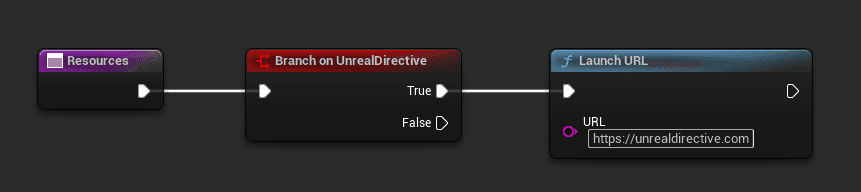
The Get node is replaced with a Branch on Boolean node that displays the variable name and has True/False execution outputs.
Understanding the Converted Node
After conversion, your new node will have:
Input Pin
- Execute - The execution input pin (white arrow). Connect this to your event or previous node's output.
Output Pins
- True - Executes when the boolean variable is
true - False - Executes when the boolean variable is
false
Node Title
The node title displays as "Branch on [VariableName]" (e.g., "Branch on bIsAlive"), making it immediately clear which variable controls the branch.
Converting Existing Workflows
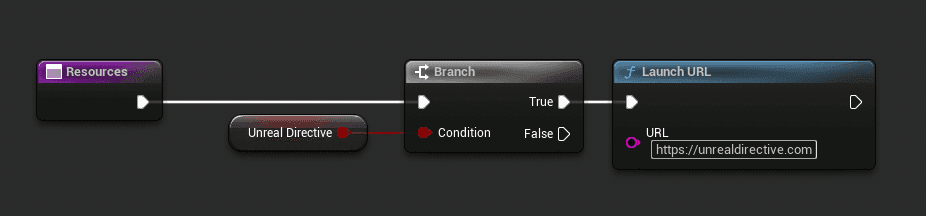
Before: Traditional Pattern
After: Branch on Boolean
Next Steps
- Variable Selection - Learn how to change which variable the node uses
- Node Reference - Complete reference for all node features